.png)

Use EVOLV the right way!
Read our guide to make sure you're getting the most accurate data and insights possible.
Read our guide to make sure you're getting the most accurate data and insights possible.
Any questions?
We're here to help!
Is EVOLV available on the Apple App Store?

EVOLV is not yet available on the Apple App Store - but we're actively working on bringing the app to IOS users.
In the meantime, you can use the web version of EVOLV with the same core functionality and experience.
In the meantime, you can use the web version of EVOLV with the same core functionality and experience.
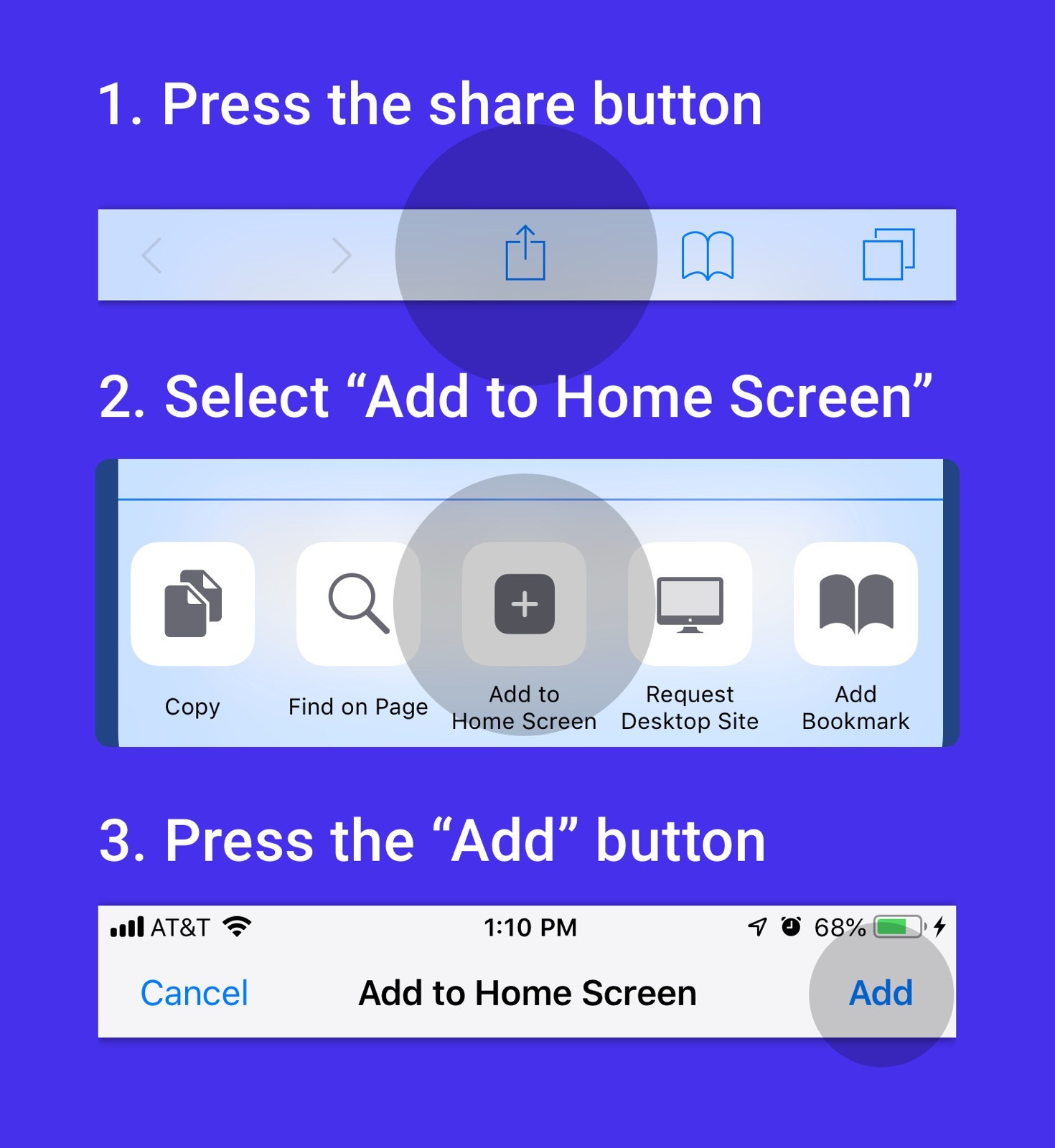
Add EVOLV to your Home Screen (Apple Users)
1. Go to the Safari app on your iPhone.
2. Go to the website.
3. Tap the ellipsis, then tap Share.
4. Scroll down the list of options, then tap Add to Home Screen.
If you don’t see Add to Home Screen, you can add it.
Scroll down to the bottom of the list, tap the box with an arrow.
Edit Actions, then tap the plus, Add to Home Screen.
5. Turn on Open as Web App.
6. Tap Add.
Using EVOLV as a web app gives you an app-like experience directly from your Home Screen.
Once added, EVOLV launches just like a native app and supports notifications and seamless access directly from your Home Screen.
2. Go to the website.
3. Tap the ellipsis, then tap Share.
4. Scroll down the list of options, then tap Add to Home Screen.
If you don’t see Add to Home Screen, you can add it.
Scroll down to the bottom of the list, tap the box with an arrow.
Edit Actions, then tap the plus, Add to Home Screen.
5. Turn on Open as Web App.
6. Tap Add.
Using EVOLV as a web app gives you an app-like experience directly from your Home Screen.
Once added, EVOLV launches just like a native app and supports notifications and seamless access directly from your Home Screen.
How do I sync my OURA data to EVOLV?
Syncing your Oura data is automatic.
1. Open the Oura App
2. Open EVOLV
Your latest data - including sleep, stress, readiness and recovery metrics - will automatically sync and display inside EVOLV.
1. Open the Oura App
2. Open EVOLV
Your latest data - including sleep, stress, readiness and recovery metrics - will automatically sync and display inside EVOLV.
How do I log an item?
1. Open the Logging menu
a. Desktop: left-hand sidebar
b. Mobile: floating pencil or plus (+) button
2. Select the type of log you want to create
a. Food & Drink
b. Supplements
c. Activity
d. Medications
e. Symptoms
f. Bowel Movements
3. Enter your details such as time, date, notes or any other fields
4. Tap Log to save your entry
a. Desktop: left-hand sidebar
b. Mobile: floating pencil or plus (+) button
2. Select the type of log you want to create
a. Food & Drink
b. Supplements
c. Activity
d. Medications
e. Symptoms
f. Bowel Movements
3. Enter your details such as time, date, notes or any other fields
4. Tap Log to save your entry
What gets logged automatically?
All supported Oura metrics automatically sync into EVOLV (once Oura's app has been opened) including:
- Sleep
- Stress
- Readiness
- Recovery
- Activity
Lifestyle logs are entered manually, but EVOLV includes auto-population features like supplement stacks and meal templates to reduce repetitive logging.
- Sleep
- Stress
- Readiness
- Recovery
- Activity
Lifestyle logs are entered manually, but EVOLV includes auto-population features like supplement stacks and meal templates to reduce repetitive logging.
How does Supplement Impact Analysis work?
Impact Analysis helps you understand how a change in your supplement routine affects your body.
Here's how it works:
- Your baseline period represents your normal routine
- Your test period is when you introduce a lifestyle change
EVOLV compares the results between both periods and visualises:
- Performance changes
- Trends over time
- Percntage increase or decrease from your baseline
This makes it easier to identify what's genuinely helping - or hurting - your wellbeing.
Here's how it works:
- Your baseline period represents your normal routine
- Your test period is when you introduce a lifestyle change
EVOLV compares the results between both periods and visualises:
- Performance changes
- Trends over time
- Percntage increase or decrease from your baseline
This makes it easier to identify what's genuinely helping - or hurting - your wellbeing.
Will EVOLV support more wearables in the future?
Yes. We're actively working on expanding EVOLV beyond Oura to support additional wearable devices in the future.
Our goal is to create a more connected and comprehensive health optimisation platform.
Our goal is to create a more connected and comprehensive health optimisation platform.
Can I delete my personal data?
Yes - your data always remains under your control.
To permenantly delete your account and data:
Desktop
- Go to the More tab
- Scroll down and select Request Data Deletion
Mobile
- Open the Account tab
- Select Request Data Deletion
You'll be asked to confirm before your data is permenantly removed.
To permenantly delete your account and data:
Desktop
- Go to the More tab
- Scroll down and select Request Data Deletion
Mobile
- Open the Account tab
- Select Request Data Deletion
You'll be asked to confirm before your data is permenantly removed.
Need help?
Just reach out.
Just reach out.
We're here if you need support.